How to Make Your Resume ATS-Friendly: A Step-by-Step Guide
Getting a resume past an applicant tracking system is not about making it look more impressive. It is about making the information easy to identify, interpret, and match against the requirements of a job.
A resume can have strong experience and still perform poorly if its structure is difficult to parse, important information is hidden in design elements, or relevant qualifications are described using terms that don't align with the role. Building an ATS-optimized resume means making the document clear for both the software screening it and the recruiter reviewing it afterward.
- Use a clean, conventional resume structure that makes important information easy to identify.
- Use standard section headings and consistent formatting throughout the document.
- Include relevant keywords from the job description naturally rather than repeating them unnecessarily.
- Focus experience bullets on responsibilities, skills, and measurable achievements.
- Avoid tables, graphics, text boxes, icons, and other elements that can interfere with parsing.
- Tailor the resume to the role instead of using one generic version for every application.
- Check the finished resume before submitting it to identify potential ATS-related issues.
What makes a resume ATS-optimized?
An ATS-optimized resume is structured so that applicant tracking software can process the information without losing important details.
Most systems are designed to extract information such as:
- Name and contact details
- Work experience
- Job titles
- Company names
- Employment dates
- Education
- Skills
- Relevant keywords and qualifications
The exact way an ATS processes a resume varies between systems and employers. There is no single format that guarantees a resume will pass every ATS.
The safest approach is to keep the document simple, clearly structured, and relevant to the position. The same choices that make a resume easier for software to parse also tend to make it easier for recruiters to scan.
How to build an ATS-optimized resume
1. Start with a simple resume format
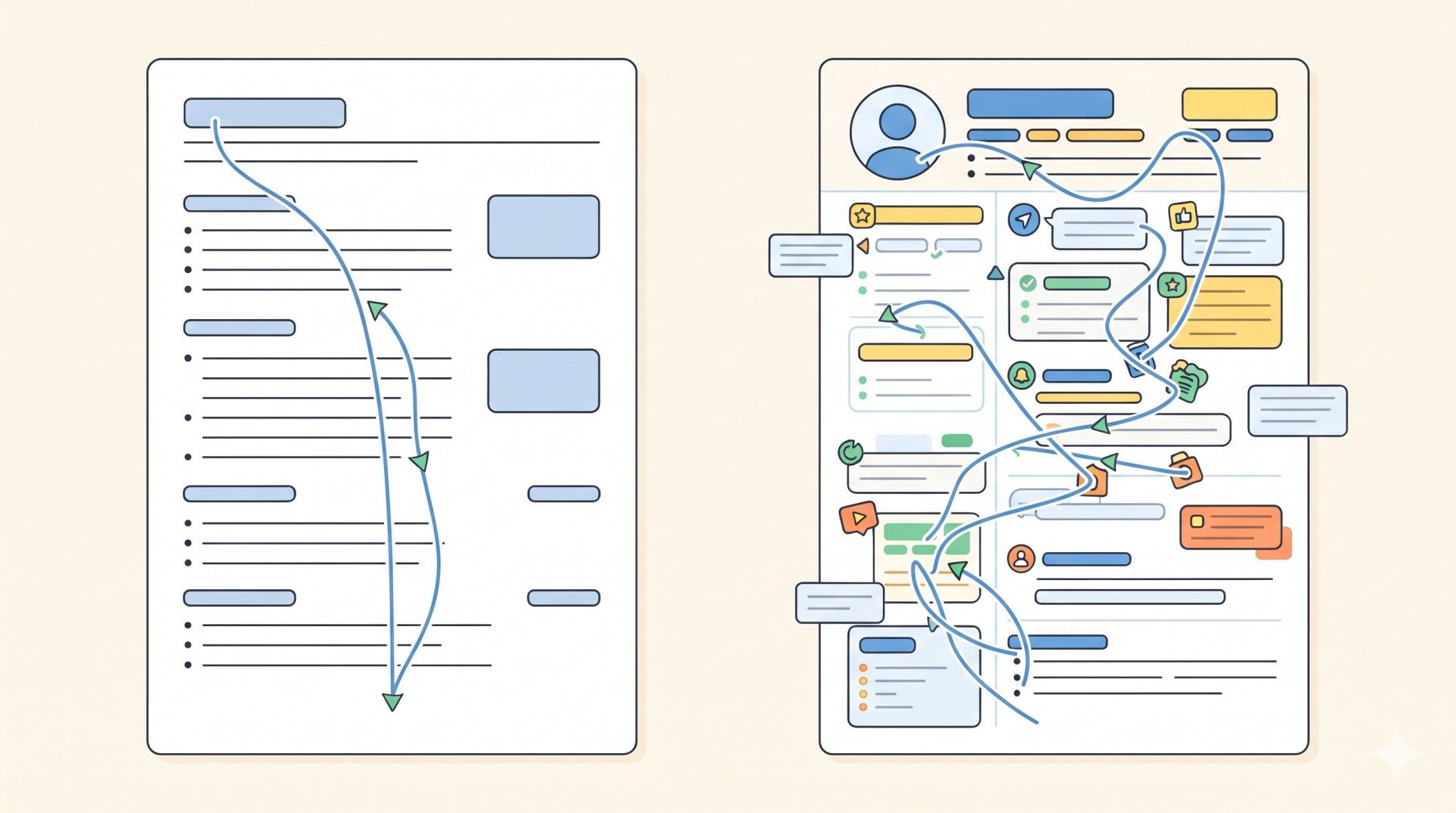
A straightforward layout gives the ATS fewer opportunities to misinterpret the information.
Use:
- A conventional single-column layout.
- Clear spacing between sections.
- A readable font.
- Consistent font sizes.
- Standard bullet points.
- Clearly separated work experience and education entries.
Avoid making the resume dependent on visual design to communicate important information. A two-column layout, decorative graphics, or complex visual elements may look attractive but can make the underlying text harder for some systems to process.
The goal is not to create a plain-looking resume. It is to create one where the content remains understandable even when the visual formatting is stripped away.
Pro Tip: Use LoopCV's AI CV Builder to create a structured resume before customising it for individual roles. A consistent base format makes it easier to maintain clear sections and update the content without introducing unnecessary formatting complexity.
2. Use standard section headings
ATS software needs to identify what different parts of a resume represent. Conventional headings make that easier.
Use headings such as:
- Professional Summary
- Work Experience
- Skills
- Education
- Certifications
- Projects
Avoid overly creative alternatives such as "Where I've Made an Impact" instead of "Work Experience." A recruiter may understand the meaning immediately, but a standard heading removes unnecessary ambiguity for automated processing.
The same principle applies to job titles and dates. Keep them clearly associated with the relevant employer and position.
3. Add relevant keywords naturally
Keywords are one of the most discussed parts of ATS optimization, but simply filling a resume with terms from the job description isn't a good strategy.
Start by identifying the qualifications that genuinely match the candidate's experience.
Look for:
- Required technical skills.
- Relevant software or platforms.
- Certifications.
- Job-specific terminology.
- Industry-relevant skills.
- Responsibilities that match previous work.
- Qualifications explicitly mentioned in the posting.
If the job description asks for "project management," and the candidate has genuinely managed projects, use that terminology where it accurately describes the experience.
Don't add a skill simply because it appears in the job description. Keyword matching should improve the visibility of relevant experience, not create qualifications that don't exist.
Pro Tip: LoopCV's Resume Keywords Scanner can compare resume content with a job description and identify relevant or missing keywords. Use the results as a guide for improving the wording, then check that every added term accurately reflects the candidate's experience.
4. Write experience bullets around achievements
An ATS can identify keywords, but getting a resume through an automated screening process is only one part of the application.
Recruiters still need to understand what the candidate actually accomplished.
Instead of writing:
- Responsible for managing social media.
- Worked on SEO campaigns.
- Helped with content creation.
Use specific descriptions that show the work and its outcome:
- Managed social media campaigns across three platforms, increasing engagement by 35% over six months.
- Planned and executed SEO campaigns that increased organic traffic across priority landing pages.
- Created and optimised long-form content targeting high-intent search queries.
This approach gives the resume more useful information while naturally incorporating relevant skills and terminology.
5. Make job titles and dates easy to identify
Employment history should be immediately understandable.
A typical entry can follow this structure:
Job Title
Company Name | Location
Month Year – Month Year
Then list the most relevant responsibilities and achievements underneath.
Avoid putting dates in unusual locations or separating them too far from the corresponding role. The ATS should be able to associate the job title, employer, and dates with the same position.
Consistency also matters. If one role uses "Jan 2024 – Present" and another uses "01/24 – Current," standardise the format throughout the document.
6. Keep important information out of graphics and text boxes
Design elements can create parsing problems when they contain information that the ATS needs to extract.
Avoid placing important details inside:
- Images.
- Charts.
- Logos.
- Text boxes.
- Headers or footers.
- Decorative graphics.
- Complex tables.
For example, listing skills only through a visual rating system such as "SEO ★★★★★" provides little useful information to an ATS compared with simply writing SEO in a clearly labelled Skills section.
The same applies to contact information. Keep the candidate's name, email address, phone number, and other essential details in the main document content rather than relying on visual elements.
7. Tailor the resume to each important application

A resume doesn't need to be rewritten from scratch for every job. However, using exactly the same version for every application can make relevant experience less visible.
For each important role, review:
- The job title.
- Required skills.
- Preferred qualifications.
- Key responsibilities.
- Relevant achievements.
- Terminology used repeatedly in the job description.
Then adjust the resume where appropriate.
For example, a candidate with both content marketing and SEO experience may emphasise different achievements when applying for an SEO Strategist role compared with a Content Marketing Manager position.
Tailoring should remain truthful. The objective is to bring relevant experience forward, not manufacture a different professional background for every application.
Pro Tip: LoopCV's AI CV Checker can help review the resume before submission and identify areas that may need improvement. Use it alongside the job description rather than treating the score as the only measure of resume quality.
8. Check the final file before submitting
Even a well-written resume can develop problems during the final editing stage.
Before uploading it, check:
- Whether all text is selectable.
- Whether headings are clear.
- Whether employment dates are consistent.
- Whether bullet points are formatted consistently.
- Whether important keywords are present where relevant.
- Whether contact details are correct.
- Whether there are spelling or formatting errors.
- Whether the file opens correctly.
- Whether the requested file format has been followed.
It is also useful to look at the resume as a recruiter would. If the most relevant experience cannot be found quickly, the document probably needs another round of editing.
Common ATS resume mistakes
- Keyword stuffing: Repeating the same keyword throughout the resume does not make a candidate more qualified. Use terminology where it naturally describes genuine experience.
- Overdesigned templates: Graphics, columns, icons, and complex layouts can interfere with parsing. A clean structure is usually safer.
- Using non-standard section names: Creative headings may look distinctive but can make sections harder to classify. Standard headings are clearer.
- Hiding information in headers and footers: Important contact details or qualifications should remain in the main body of the document whenever possible.
- Using one resume for every application: A generic resume may contain the right experience but fail to emphasise what matters most for a particular role.
- Adding skills that aren't actually possessed: ATS optimization should never become an exercise in matching keywords at any cost. False qualifications can create problems during interviews and later stages of hiring.
- Focusing only on the ATS score: An ATS score can provide useful feedback, but it isn't a hiring decision. A resume still needs to demonstrate relevant experience, achievements, and a clear professional story.
How LoopCV can help build an ATS-optimized resume
ATS optimization involves more than formatting. The resume needs to contain relevant information, match the role appropriately, and remain easy for recruiters to understand. LoopCV provides tools for different parts of that process.
- Build a resume: The AI CV Builder helps create and customise resume content.
- Check ATS readiness: The AI CV Checker helps identify potential issues with resume content, structure, and ATS compatibility.
- Find relevant keywords: The Resume Keywords Scanner compares the resume with a job description to identify keyword gaps and areas of alignment.
- Find suitable roles: The AI Job Search Tool helps discover jobs based on the candidate's selected preferences.
- Create cover letters: The AI Cover Letter Generator helps prepare application-specific cover letter drafts.
- Automate applications: LoopCV's application automation can handle repetitive application tasks for matching roles.
- Track applications: Application tracking features help organise submitted applications and monitor progress.
These tools can support different parts of the job search, but the candidate remains responsible for verifying that the resume is accurate and that the information presented reflects genuine experience.
Conclusion
Building an ATS-optimized resume is less about trying to predict how an applicant tracking system will score a document and more about creating a clear, relevant, machine-readable resume.
Use a simple structure, standard headings, relevant keywords, clear experience bullets, and consistent formatting. Remove unnecessary design elements that could interfere with parsing, then tailor the content to the roles that matter most.
An ATS-optimized resume should ultimately work for both audiences: the software needs to understand the information, and the recruiter needs to see why the candidate is relevant.
FAQs
What is an ATS-optimized resume?
An ATS-optimized resume is structured and written in a way that makes its information easier for applicant tracking software to parse and match against job requirements.
What resume format is best for ATS?
A simple, single-column format with clear section headings, standard fonts, consistent formatting, and selectable text is generally a safe choice for ATS compatibility.
Should an ATS resume contain keywords?
Yes, when the keywords accurately describe the candidate's relevant skills, experience, qualifications, or responsibilities. Keywords should be incorporated naturally rather than repeatedly stuffed into the document.
Can an ATS read a two-column resume?
Some ATS platforms can process two-column resumes, but parsing capabilities vary. A simple single-column layout reduces the risk of important information being interpreted incorrectly.
Does an ATS score guarantee an interview?
No. An ATS score is only one indicator and doesn't guarantee that a candidate will be shortlisted. Recruiters also consider experience, qualifications, achievements, and overall suitability for the role.
How often should an ATS resume be updated?
The resume should be reviewed whenever the candidate gains significant experience, develops new skills, changes career direction, or applies for roles with substantially different requirements.