AI Applied to the Wrong Jobs: What Happens Next?
Auto apply to jobs with AI can save hours of repetitive work by finding jobs and handling applications at scale. But what happens when it starts applying to the wrong jobs?
A few bad matches are easy to ignore. At scale, they can mean repeated applications to roles that are too senior, too junior, in the wrong location, below the expected salary, or simply a poor fit. Add incorrect screening answers or a generic application, and the problem can go beyond a wasted application.
The more applications an AI job applier sends, the more important the initial targeting becomes. A broad job title, loose location settings, missing exclusions, or outdated profile information can affect dozens of applications before the problem is noticed. Knowing where these mistakes happen makes it easier to build an automated job search that stays focused.
- The wrong job can mean the wrong level, field, location, salary, company, or hard requirement.
- The biggest risks include bad-fit applications, incorrect screening answers, generic applications, and losing track of what was sent.
- More applications do not automatically mean more interviews.
- Clear targeting, exclusions, and regular review can help keep an AI job applier focused.
- LoopCV helps job seekers find and filter relevant jobs, exclude companies, review matches, track applications, and automate applications based on their preferences.
Why is auto apply to jobs with AI growing so fast?
Applying by hand is slow. Every application means a new form, the same details typed again, and a set of screening questions. Meanwhile, roles get flooded. LinkedIn applications grew more than 45% in a year and reached about 11,000 per minute in June 2025.
So people reach for automation. It feels like the only way to keep up. New tools appear every month, and the quality varies a lot. Some are careful about targeting. Others send your CV to anything that shares a keyword with your job title.
Also read: Can AI apply to jobs for me automatically?
What counts as the "wrong job"?
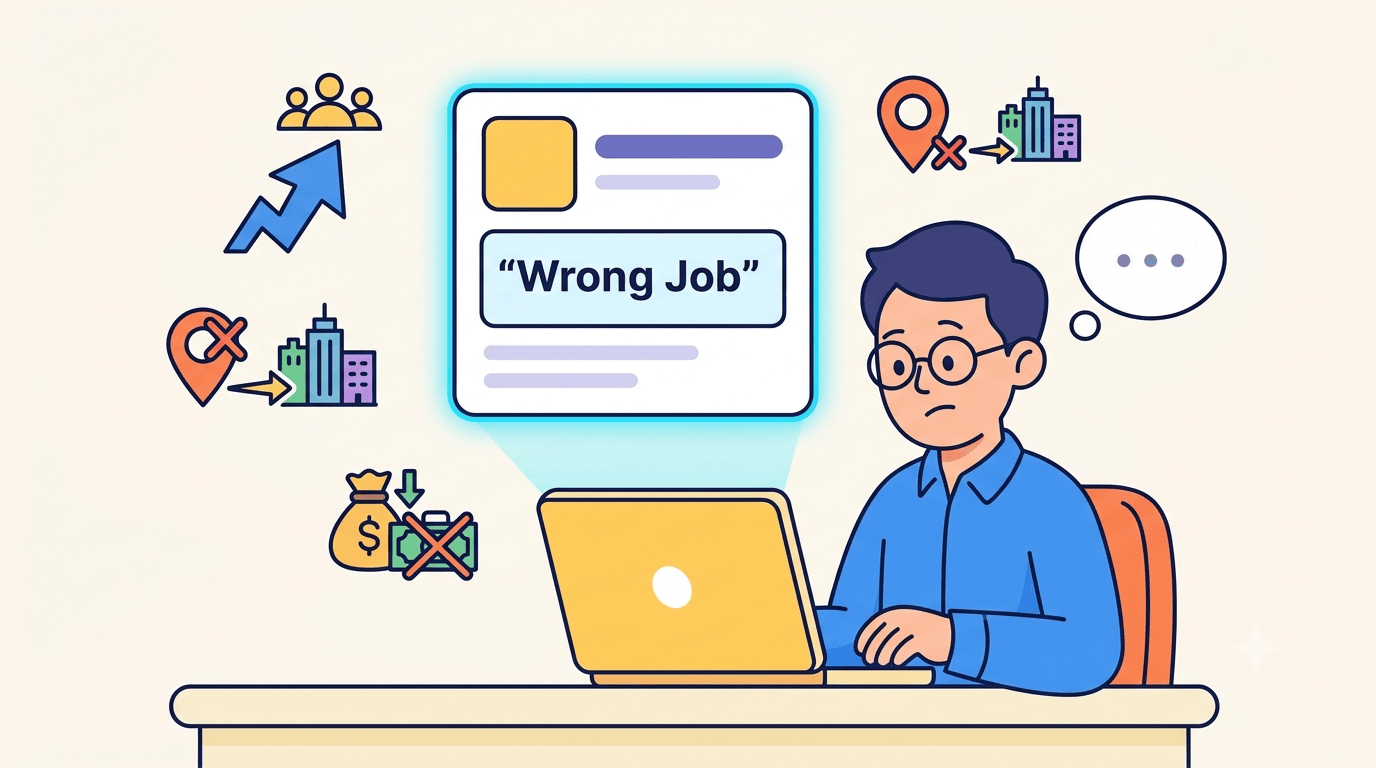
A wrong job is more than a job you don't like. An AI job applier can get it wrong in several ways:
- Wrong level. Too junior or too senior for you.
- Wrong field. A similar title, but different duties.
- Wrong location or work setup. Onsite when you wanted remote, or the wrong country.
- Wrong pay range. Far below what you'd accept.
- Wrong company. One you'd never work for, or your own employer.
- Wrong requirements. Jobs that need a visa status, licence, or degree you don't have.
A tool matches on whatever you gave it: titles, keywords, and filters. If those are loose, the matches are loose. That is why the setup matters so much.
What happens when an AI job applier targets the wrong jobs?
1. You collect rejections from jobs you were never going to get
Applying outside your level or field leads to quick rejections. A pile of "unfortunately" emails is discouraging, and it does not help you learn anything, because you didn't pick those jobs.
Volume also does not make up for poor fit. According to some sources, people who send the most applications are 39% less likely to get a positive response.
2. Wrong answers on screening questions can end an application early
Many applications include yes/no questions about work authorisation, salary, or years of experience. A wrong answer can stop the application before a human reads it. Small form errors can also slip through when nobody checks what the tool typed.
One Reddit thread has users describing this kind of slip, where the tool filled a form field with the wrong detail.
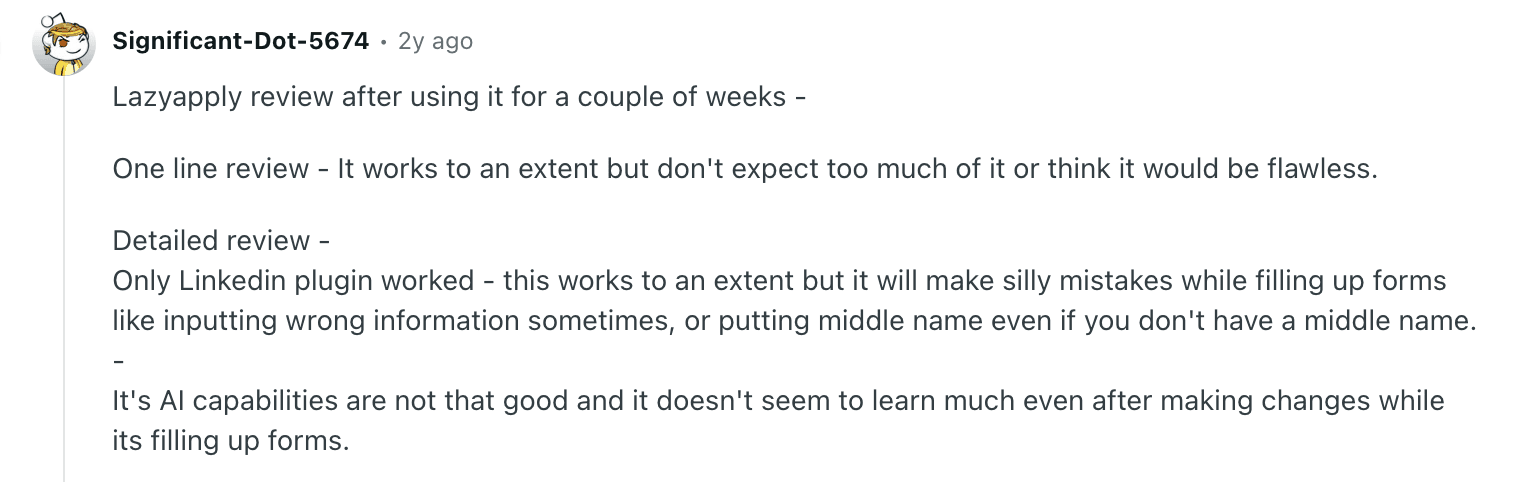
The important part is that you don't see these errors until it's too late, if you see them at all.
3. Generic, careless applications get ignored
If the same CV and the same wording go to every role, recruiters notice. A name or role detail in the wrong place, or a cover letter that could be for any company, signals that nobody was paying attention.
It can get worse than generic. In another Reddit thread, a commenter flagged incorrect information about their work history in applications sent on their behalf.
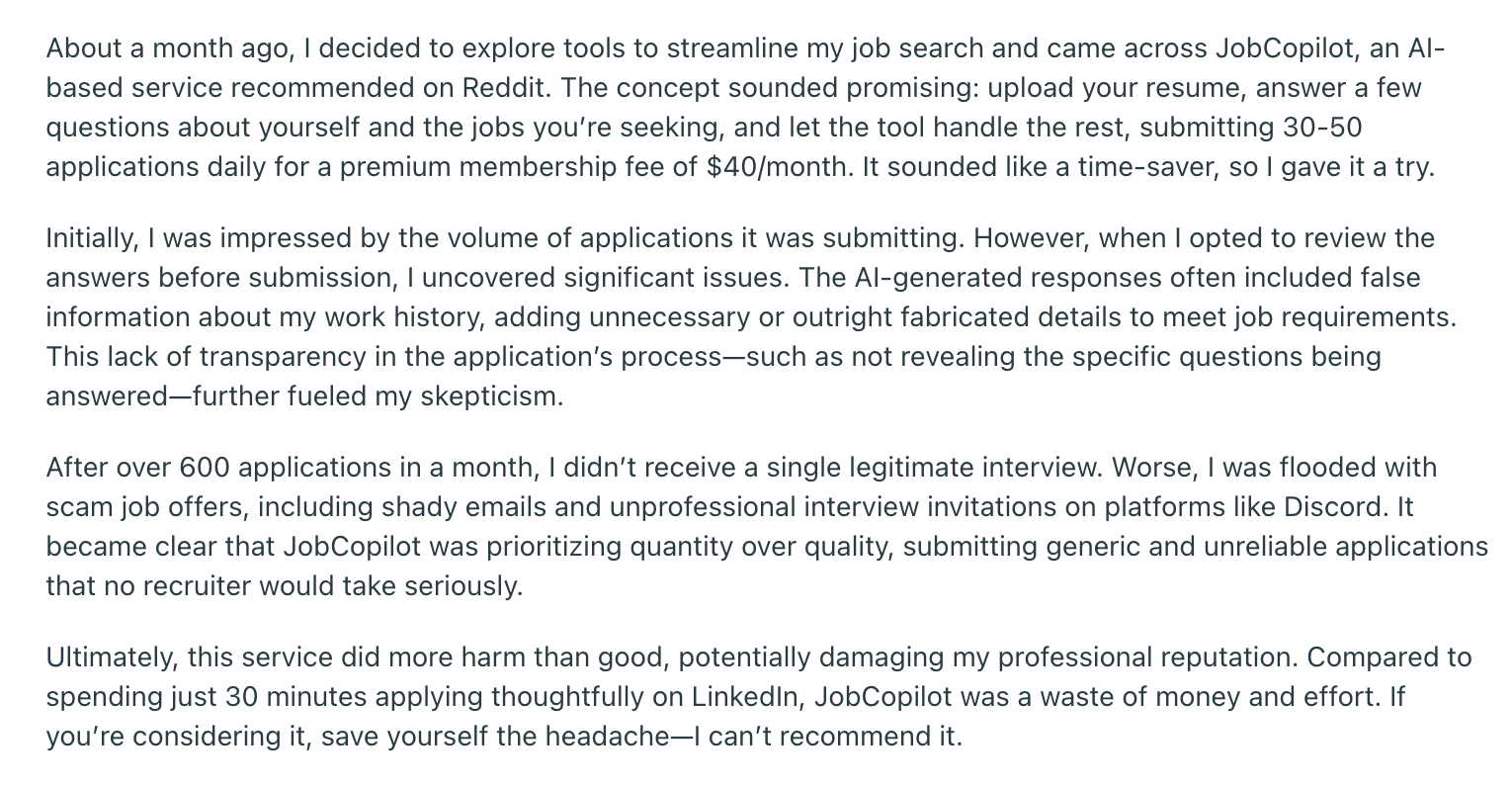
That is a bigger problem than a bad match. It is false information under your name.
4. You lose track of what was sent
When an AI job applicant runs on its own, you can end up not knowing where you applied, which CV went out, or what was said. Then a recruiter emails you about a role you don't remember, and you have to answer cold.
The same lack of records causes duplicate applications to the same job, which looks careless.
5. Hundreds of applications, no replies
This is the most common complaint. People send hundreds of applications and hear nothing, and then they can't tell whether the problem is the tool, the CV, or the job list.
Activity feels like progress, but it isn't. If you are stuck here, it's very common to get confused about what to do after 100 applications with no response.
6. Your name with recruiters can take a hit
Recruiters remember patterns. Bad-fit applications to the same recruiter, repeated applications to one company, or a run of wrong-level applications all leave a mark.
One Redditor goes further and says the tool did more harm than good and may have hurt their professional reputation.
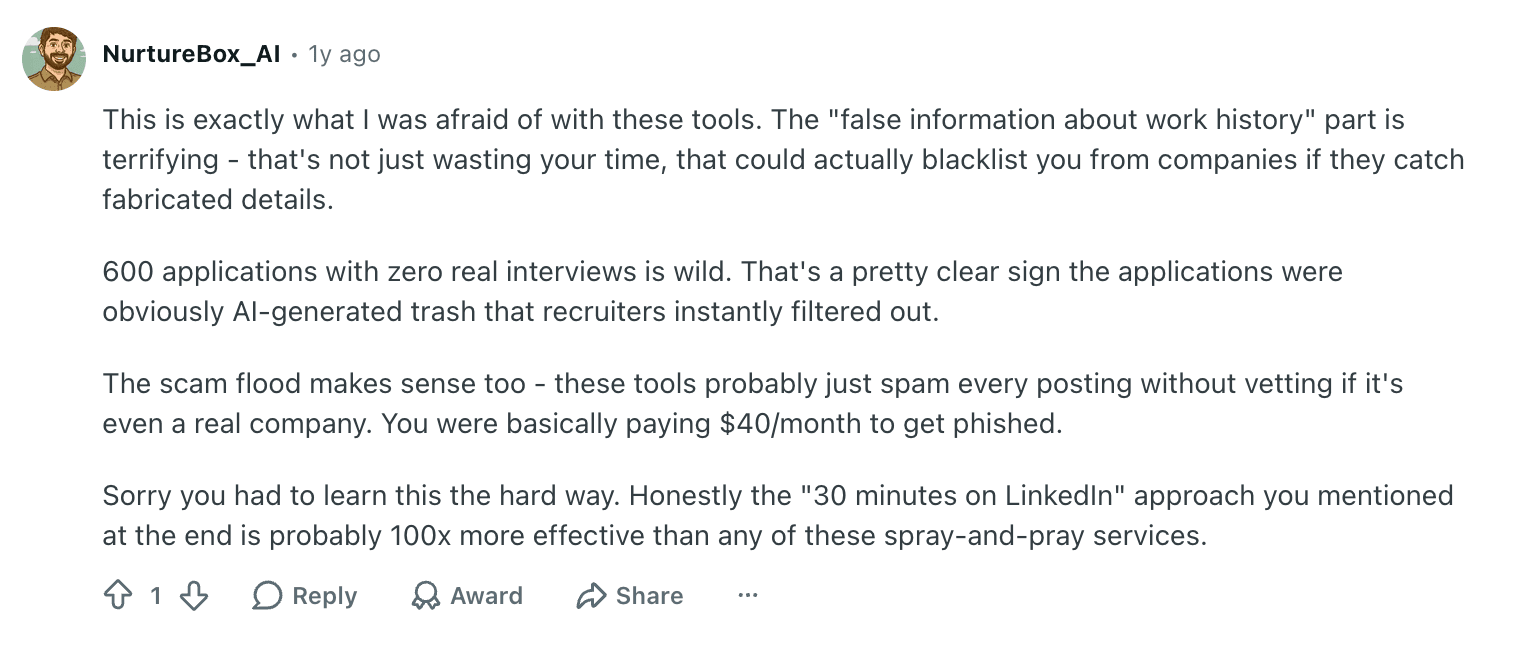
You don't need to take that as a rule for every tool. It is a fair picture of what people fear when they hand over control.
The point across all six: the tool is not the problem. Unchecked scale is.
Is AI auto apply still worth using?
Yes, when you set it up carefully. The results depend on how the tool is used.
Here is how the approaches compare:
Auto apply works best when you have a clear target role, a strong and accurate CV, and you check the first batch before letting it run. It goes wrong when titles are vague, locations are wide, nothing is excluded, and you never look at the results.
Also read: Does auto applying to jobs actually work?
How to keep an AI job applier on target
These steps work with any AI job search tool:
- Be specific with job titles. Use the exact titles you want, and list the ones you don't.
- Set location and work type clearly. Remote, hybrid, or onsite, and which countries.
- Exclude companies. Your current employer, past employers, and any company you'd never join.
- Set level and pay filters. Keep junior and senior roles out of your list.
- Review the first 10 to 20 matches before you let it apply on its own.
- Check the answers to screening questions. Especially work authorisation, salary, and experience.
- Track results every week. Look at replies, not just the number sent.
- Test more than one CV. Keep the one that gets responses.
Pro tip: Before you scale up, check your CV with the free ATS Resume Keywords Checker. If your CV doesn't match the roles you want, the tool will match you to the wrong ones.
How LoopCV helps prevent these problems
LoopCV is built to make automated job applications more targeted and easier to manage. It gives job seekers control over which jobs enter the application pipeline, which companies to exclude, and when to let automation take over. Once the right matches are in place, the platform also helps manage questions, applications, and results.
- Find relevant jobs: Set specific job titles, locations, and keywords with Job Filtering and Job Matching.
- Exclude unwanted companies: Use Company Exclusion to remove specific companies from the search.
- Review before applying: Use One-Click Apply to check a job before submitting an application.
- Automate applications: Switch to Auto Apply once the search is producing relevant matches.
- Handle screening questions: AI Question Answering helps answer questions during applications.
- Track applications: The Job Application Tracker keeps submitted applications organised.
- Test different CVs: CV Statistics and A/B Testing help identify which CV performs better.
- Prevent duplicate applications: LoopCV has safeguards to reduce duplicate and excessive applications.
Pro tip: Start with a narrow search, review the first 10–20 matches, and tighten the filters before switching to Auto Apply. Before scaling your applications, review your setup with How LoopCV Works.
A safe way to start:
- Upload your CV and create one loop with a narrow job title and location.
- Choose one-click apply so you review each match first.
- Check the first 10 to 20 matches. If the fit is off, tighten your filters and add company exclusions.
- Switch to auto apply only when the matches are consistently right.
- Check your tracker weekly and adjust.
You can test this on the free plan before paying for anything.
Conclusion
AI auto apply can take much of the repetitive work out of a job search, especially when there are dozens of relevant roles to apply to. The results depend heavily on how well the search is set up and how closely the applications are monitored.
Clear job titles, locations, salary expectations, seniority levels, company exclusions, and accurate profile information can help keep irrelevant jobs out of the application pipeline. Reviewing the first few matches also makes it easier to catch problems before they are repeated across dozens of applications.
LoopCV gives job seekers the tools to build those controls into an automated job search, from job filtering and company exclusions to application tracking and review options. Once the matches are consistently relevant, Auto Apply can handle the repetitive work at a much larger scale.
FAQs
Is AI auto apply safe to use?
It can be, if you control the targeting and review the output. Risks come from loose settings and no oversight.
Can I control which jobs an AI job search tool applies to?
With a good tool, yes. Look for filters for title, location, level, and work type, plus company exclusions and a review step.
How many jobs should an AI job applier apply to per day?
It depends on your field and how narrow your targeting is. Start small, check the quality, and increase only when the matches are right.
Does AI auto apply lead to interviews?
Sometimes. Results depend on your CV, your targeting, and the market. More applications alone do not raise your chances.